6 min read
A ScreenFlow Alternative for Mac That Starts Free
ScreenFlow is $199 for one Mac, with paid major upgrades. FramioCam for Mac records, edits and captions for free, and Pro is a single payment.
- comparisons
- screen-recording
- screenflow-alternative
- mac
- no-subscription
KEY TAKEAWAYS
- ScreenFlow from Telestream's store is $199 for one activation, read on 20 November 2026. New major versions are paid upgrades; Telestream says webstore owners usually get about 30% off them.
- FramioCam for Mac is free to download, with watermarked exports. Pro For Mac is one payment, and the first founders' licences include every future update.
- Keep ScreenFlow if you record an iPhone or iPad, run an Intel Mac, export ProRes, or use its stock media library and title templates.
A ScreenFlow alternative is worth a look if you make screen tutorials on a Mac and do not want to pay $199 before your first export. FramioCam for Mac records your screen, camera and the Mac’s own sound, edits on a timeline with zooms made from your clicks, and captions on the device; it is free to start, and Pro is one payment.
ScreenFlow is not a subscription either, so this is not a “stop paying monthly” post. The differences are in what you pay up front, what happens at the next major version, and which Macs and devices each app supports.
ScreenFlow and FramioCam for Mac, read on 20 November 2026
ScreenFlow facts are from Telestream’s store, tech specs and overview pages, all read on 20 November 2026.
| ScreenFlow (Telestream webstore) | FramioCam for Mac | |
|---|---|---|
| Up-front price | $199 | Free download; Pro For Mac is one payment |
| Bundles | Super Pak with Stock Media Library $275; Super Pak + Premium Support $325 | None |
| Next major version | Paid upgrade; Telestream says it usually discounts upgrades by about 30% | First founders’ licences: all future updates. Later licences: a year of updates, then optional renewal |
| Activations | 1 Mac (the Mac App Store version allows up to 5 on one Apple ID) | 1 Mac |
| Macs supported | Apple silicon and Intel, macOS Tahoe 26 and Sequoia 15 | Apple silicon, macOS 14 or later; screen recording needs macOS 15 |
| Records an iPhone or iPad | Yes | No |
| Captions | Caption editor, burn-in or soft subtitles | On-device transcription, burn-in, or SRT, VTT and text files |
| Video export | Presets including ProRes and MP4; animated GIF and APNG | MP4, WebM and GIF, up to 4K with Pro |
| Screenshots | Not listed on the overview page | Screenshot capture, scrolling capture and a screenshot editor in the same app |
| Free trial | Download after a form with your name and email | The free version, no time limit |
ScreenFlow’s store header still read “macOS Sequoia and macOS Sonoma” on the same day the tech specs page listed Tahoe 26 and Sequoia 15. If your Mac is on Sonoma, ask Telestream which version supports it before you buy.
The stock media library is a separate yearly charge: $99 a year after a discounted first year, and Telestream’s store says those purchases and renewals are non-refundable. Premium Support is $59 a year and includes 25% off future ScreenFlow upgrades.
The cost of the next version
A one-time licence covers the version you bought. ScreenFlow has paid major upgrades, priced at a discount for existing owners. If you upgrade every major version, the yearly cost is the upgrade price, not zero.
FramioCam for Mac splits licences in two. The first founders’ licences, on Pro For Mac or Pro For Both, include every future update. Licences sold after them keep the version they bought, with one year of updates and an optional yearly renewal after that; the Mac pricing page has the current numbers and says how many founders’ licences there are. Either way, the version you have keeps working if you stop paying.
What making a tutorial looks like in FramioCam for Mac
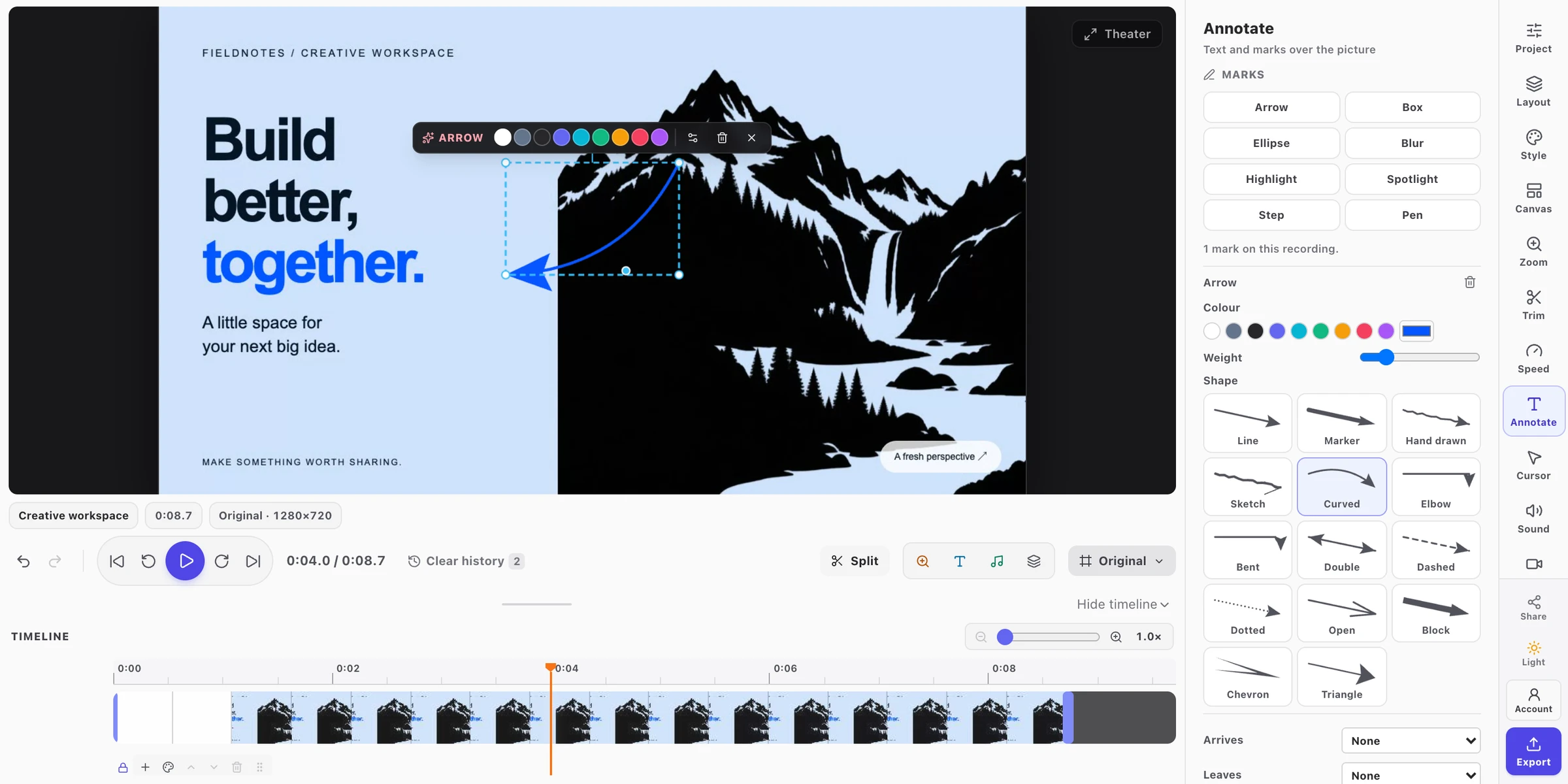
Record. A display, a window, an area or only the camera, with your microphone and the Mac’s sound. Draw on the screen while you record, and hold ⌃⇧S to scroll a long page at a steady speed. (Recording guide)
Edit. A multi-lane timeline with trim, split, ripple delete and speed changes. Zooms come from the clicks FramioCam recorded, and each one can be moved or retimed. (Video editor guide)
Caption. macOS’s on-device speech recognition writes the transcript, so the audio is not uploaded. Captions can be burned in or saved as SRT, VTT or text. (Captions guide)
Narrate and post. Since version 0.2.0 you can record a voice-over on a finished take and read a script from a teleprompter that is not recorded (Mac changelog). Pro posts the video to a Facebook Page or uploads it to YouTube. (Publishing guide)
The same app captures screenshots, including tall scrolling captures of any window, and edits them with backdrops, arrows, blur and text. ScreenFlow’s overview page does not list a screenshot tool.
Six reasons to stay with ScreenFlow
If one of these is part of your work, FramioCam for Mac is the wrong swap.
- iPhone and iPad recording. ScreenFlow records an iOS device screen for app demos. FramioCam does not.
- Intel Macs. ScreenFlow runs on Intel and Apple silicon. FramioCam for Mac is Apple silicon only.
- ProRes export. ScreenFlow lists ProRes among its export presets. FramioCam exports MP4, WebM and GIF.
- Stock media. ScreenFlow’s library has images, music and video clips inside the editor. FramioCam ships backdrop wallpapers, not stock footage or music.
- Titles, animations and templates. ScreenFlow has a title library, text and video animations, and styles and templates for a series of tutorials. FramioCam has captions and text annotations, not a motion-graphics library.
- A long record. Telestream’s overview page quotes reviewers who have used ScreenFlow for eight years or more. FramioCam for Mac reached version 0.2.0 in November 2026.
What ScreenFlow’s pages do not list
- A free version with no time limit. Make and export a full tutorial before paying; exports carry a watermark until Pro.
- An MCP server. Claude Code, Claude Desktop, Codex, Cursor or another MCP client can capture, record, edit, caption and export through FramioCam for Mac. We compared screenshot and recording MCP servers for Mac. Pro.
- Scheduled posting. Pro can post a finished video to a Facebook Page now or at a set time.
- A browser version. If you also record on Windows or a Chromebook, FramioCam for Chrome works there, and Pro For Both covers the two apps with one payment.
Before you switch
Record one real tutorial in the free version, end to end, on the Mac you use for work. If it covers what you make, compare Pro For Mac and Pro For Both; code BFCM30 applies to both until the end of December, and the deals page shows the prices with it.
Weighing Camtasia as well? We did the same comparison for Camtasia’s yearly plans.
FAQ
Is ScreenFlow a subscription? No. On 20 November 2026 Telestream’s store sold ScreenFlow for $199 as a one-time purchase. Major new versions are paid upgrades, and the Stock Media Library add-on is billed yearly.
Is there a free ScreenFlow alternative for Mac? FramioCam for Mac is free to download and use, with a FramioCam watermark on exports. Pro For Mac removes the watermark and adds 4K export, publishing and the MCP server for one payment.
Can I open ScreenFlow projects in FramioCam? No. ScreenFlow’s project files are Telestream’s own format. Export the finished video from ScreenFlow and keep the projects you might edit again.
Does FramioCam for Mac work on Intel Macs? No. It needs an Apple silicon Mac on macOS 14 or later, and screen recording needs macOS 15. ScreenFlow lists both Intel and Apple silicon.