Recorded in the Chrome extensionSound off · Fullscreen available
A screenshot with something to say.
Add a backdrop, choose a window frame, and draw attention to the details. Make a simple capture ready to share.
Explore screenshot editingTake full-page screenshots, record walkthroughs, and edit both in Chrome.
Export a screenshot or video when you’re done.
Screenshot or record
anything on your screen.
Edit, annotate, and
bring your ideas to life.
Export, copy, or sync
your work instantly.
Powerful editing studio
Trim, annotate, add effects, and create professional videos with ease. FramioCam Studio gives you the tools to make your screenshots and recordings shine.
Available export formats depend on your browser and device.
Small details. Big difference.
From a quick capture to the final cut, keep your flow in one place.
Recorded in the Chrome extensionSound off · Fullscreen available
Add a backdrop, choose a window frame, and draw attention to the details. Make a simple capture ready to share.
Explore screenshot editingRecorded in the Chrome extensionSound off · Fullscreen available
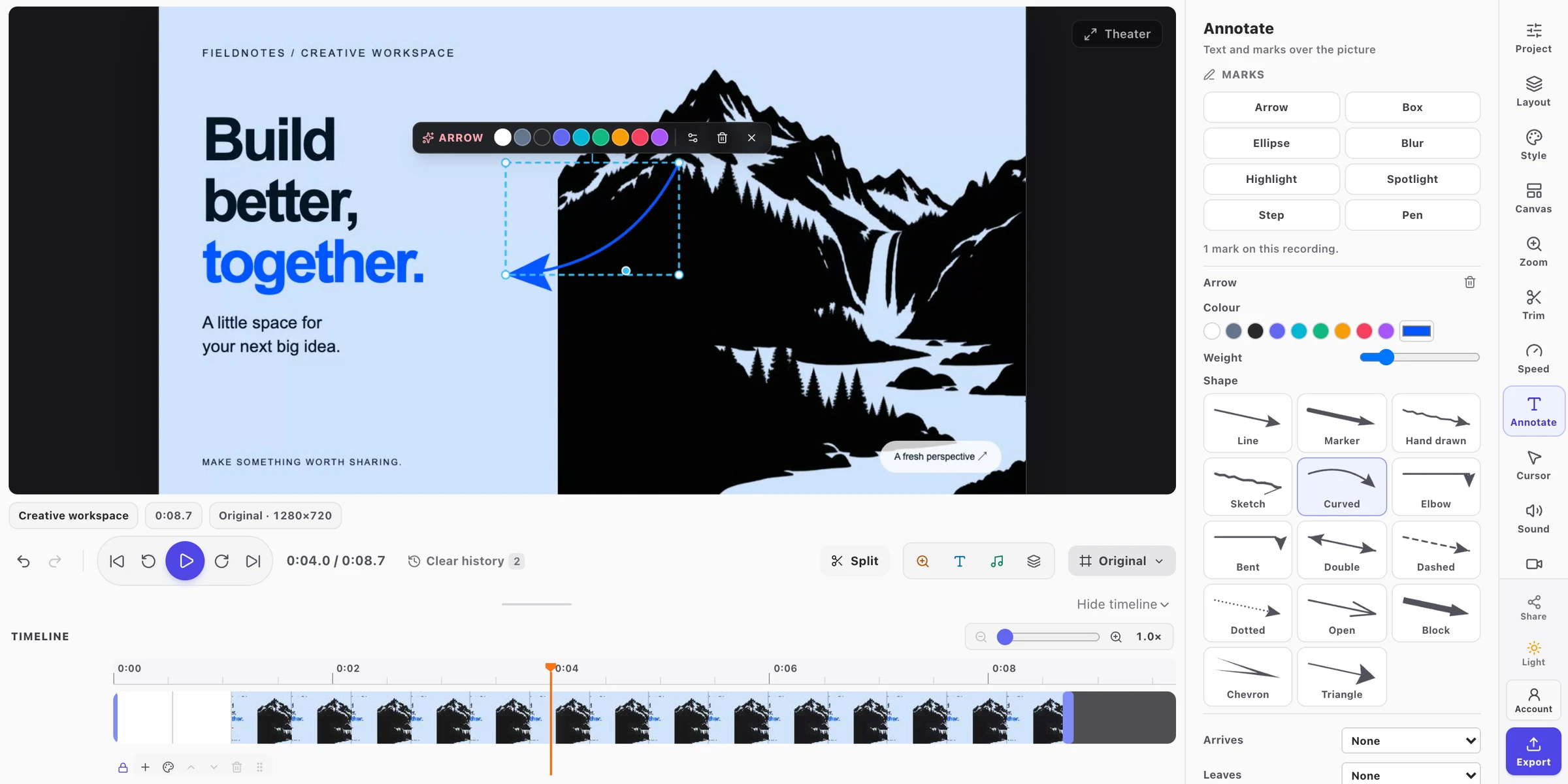
Cut the pauses. Zoom into a detail. Add text and annotations on the timeline to make every walkthrough clear.
Explore video editingA visible area, a scrolling page, or a precise region. Record a tab, window, or your whole screen.
Explore captureCaptures, recordings, and edits stay on your device. Your media is never uploaded to FramioCam.
How privacy worksPro and Teams add optional Google Drive sharing and project sync across your devices.
Explore cloud syncSee the details in action
The finishing touches make the difference.
Pick a tool and watch it work in FramioCam.
Zoom to the things you clicked. Move, resize, and retime every zoom on the timeline.
Give your pointer a clear highlight and every click a ripple. Adjust the colour, size, and timing after recording.
See dissolves, wipes, and slides before you choose. Apply a transition and set its timing on the timeline.
Point things out with arrows, text, and highlights. Choose exactly when each annotation appears.
Turn a widescreen walkthrough into a square post or vertical clip. Change the canvas without recording again.
Export MP4, WebM, GIF, or a PNG frame. Available formats and resolutions depend on your plan, browser, and device.
Coming next to Chrome
In development for an upcoming extension update. These additions are not available in the current Chrome Web Store release.
51 wallpapers bring eight FramioCam originals and 43 macOS backgrounds to screenshots and videos. Download on first use, then reuse them offline.
One collection picker, with download progress and retry.
14 arrow shapes with bend and turn controls, screenshot annotation resize handles, and matching tool keys in both editors. N selects Step; S stays Split in video.
Resize video marks beyond the frame, with undo for each adjustment.
Select, resize, delete, and undo your own brand watermark directly on the picture in either editor. Find video black-edge trimming in Canvas.
Editing your brand mark does not remove the free plan’s FramioCam watermark.
Made for your everyday work
What people say about FramioCam.
“FramioCam is a powerful yet easy-to-use tool for screen recordings and screenshots, including webcam capture. It even comes with a built-in video editor for adding annotations and so much more. Really handy and simple to use. Thanks for this great tool.”

“I just tried it, and honestly, it’s unbelievable that a tool with so many amazing features is available for free! Absolutely impressive work! 🔥👏”

“FramioCam is a great and easy-to-use tool for recording my screen and taking screenshots. The interface is simple, and everything works smoothly. It is very useful for everyday tasks. Highly recommended!”

“Very easy to manage and genuinely user-friendly!”

“super easy screen recorder to use and gets the job done without any hassle”

“have been spending years looking somethin like this. thanks to the creator... super easy and packed with functions i need.”

Simple pricing
Start for free. Get more room to create with a one-time payment.
$0free forever
Capture, edit and export. Upgrade when you want a professional finish.
No card. No trial clock.
$19one-time payment
Every individual feature. Clean exports, cloud sync and room for your second machine.
Pay once. No subscription. 30-day refund.
Pro for your team. $39 once for 3 people · $79 once for 10 people.
Not to try it. The first 50 screenshots work with no account, and so do recording and editing. Exporting a video asks for a free account, which also removes the 50-screenshot limit.
An installation in a browser profile. Pro covers two personal devices for one person. Teams covers six devices for three people, or thirty for ten people, shared across the whole team. Release a device from your account page and connect another in its place.
Yes. Pro is $19 once. Teams is $39 once for three people or $79 once for ten people. There is nothing to renew and no subscription to cancel.
Your creative workflow starts here
From a quick screenshot to a polished walkthrough. Capture, edit, and share with FramioCam.
Free to start One-time paid plans
We use .