FEATURE — 03
The recorder
The recorder tab
- Stage
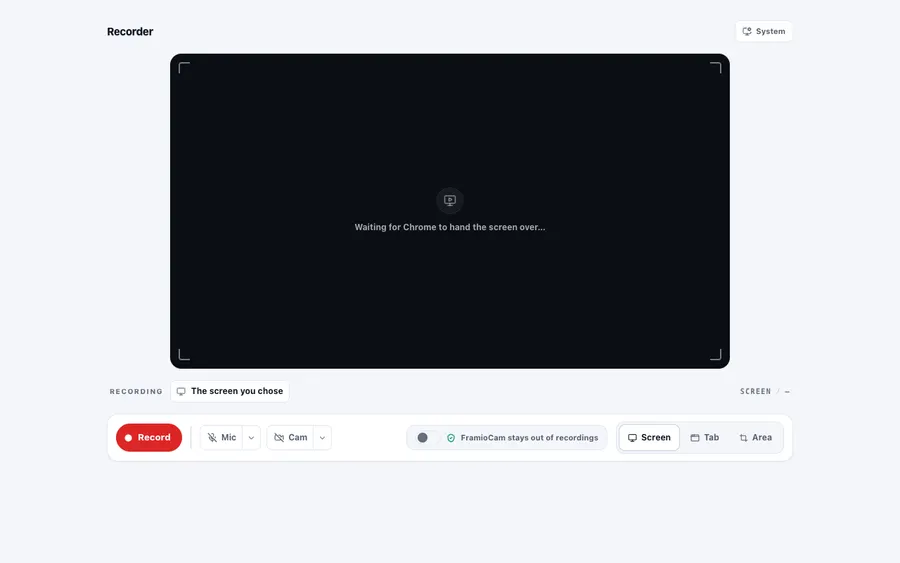
- Frames the shot at the exact export aspect with corner marks. A tab source shows a last-seen photograph that becomes a live preview once recording starts; a screen source shows a still of the surface.
- Open the recorder from the popup — setup happens in its own tab, which survives losing focus.
- Check the corner marks: they are the exact edges of the export, so anything outside them will not be in the file.
- Sources
- A target picker lists every recordable tab (favicon, title, URL); browser pages and the web store say they are off limits. Surface radios: Screen / Tab / Area.
- Choose Screen, Tab or Area.
- For Tab, pick the target from the list — browser pages and the web store are marked off limits rather than failing silently when you try.
- Mic & camera
- Device pickers with a live 12-segment microphone meter — measured where the microphone is, so it reads true mid-recording.
- Pick the microphone and camera you actually want, not whatever was last plugged in.
- Say a sentence and watch the 12-segment meter — aim for the middle of it, not the top.
- The meter is measured at the microphone, so it keeps reading true while recording.
- Boundaries
- The recorder tab itself is never part of a recording, and says so. Live captures run only while the tab is visible — nothing churns in a background tab.